
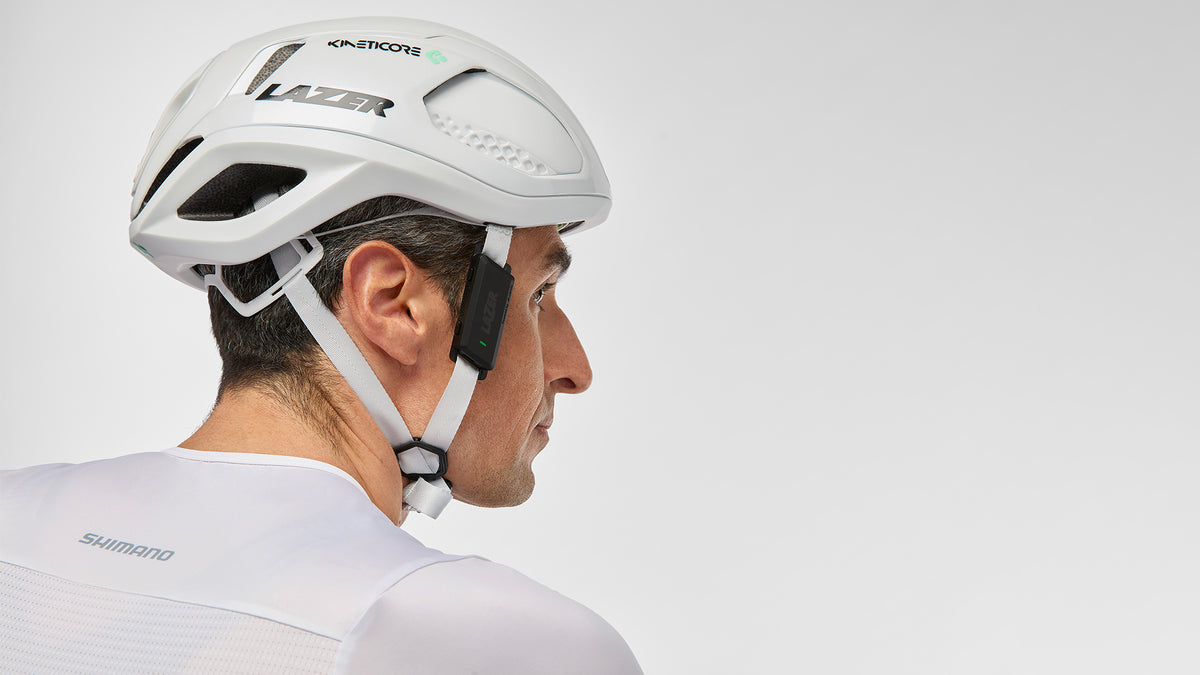
Open-ear communication and audio
Listen and be heard.


Weight:
Open-ear communication and audio experience.
Two light units that sit on your helmet strap. Talk to up to 30 riders, take calls and play music, and still hear the road. Fits all Lazer helmets except full-face, and any helmet with Y-shaped straps 15 to 18 mm wide.
- 19 g per unit
- 30 riders in one group
- 11 h battery
- IP54 dust and splash resistant
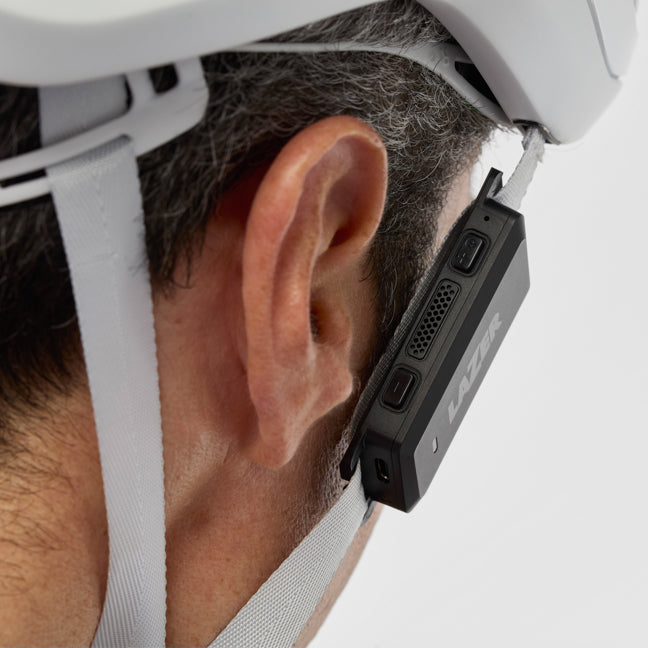
Open-ear design for safety and comfort
Hear the road. Hear your riders.
Unlike earbuds, open-ear listening sends sound through the air, so nothing blocks your ear canal. You stay aware of your surroundings, and the unit sits on the strap without touching your eyewear.

Communicate with up to 30 riders
Talk to the whole group.
Traffic noise, wind and distance break up group chat. VeloVox keeps it smooth with up to 30 riders.

Wind and noise cancelling
Crystal clear at speed.
Wind and noise cancellation keeps music and calls clear while you reach fast speeds on your bike.
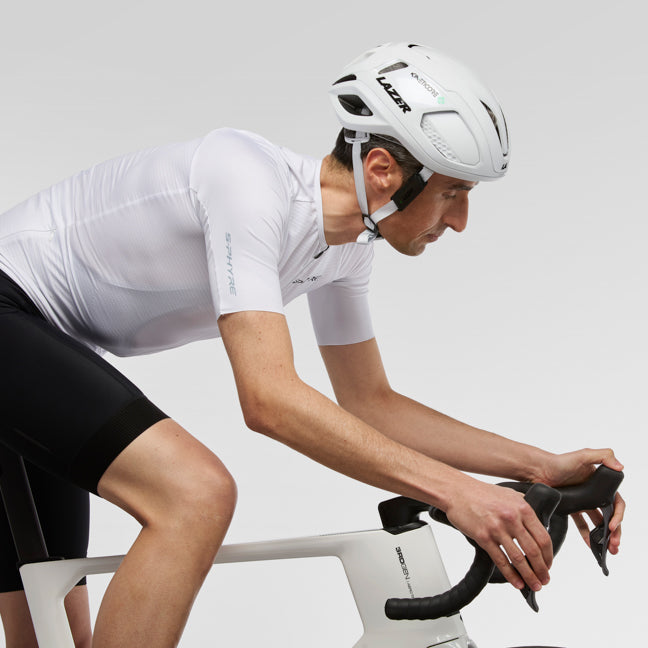
Control through Shimano products
Control it from the bars.
Connect VeloVox to Shimano Di2 and e-bike systems for easy handling.


Get started
Set up in minutes.

Quick start guide
Fit VeloVox and pair it.

Connect to Shimano Di2
Control it from your handlebar buttons.

Cardo Connect app
Free for iOS and Android. Scan to download.
Questions, answered.
How long does the battery last?
The batteries will last up to 11 hours, depending on various factors such as environmental temperature, audio volume and duration of the communication.
How do I charge it?
You can charge the device while it is installed on the helmet with the included, Y-shaped USB cable or any USB-C charging cable.
Which helmets does it fit?
VeloVox is compatible with all Lazer helmets (not including full-face helmets) and helmets that have Y-shaped straps. The width of the straps should be between 15 and 18 mm.
How do I get support?
Email lazervelovox@lazersport.com. Retailers can use the distributors page.
What is VeloVox?
VeloVox is a communication device you connect to the straps of your bike helmet, allowing you to communicate with other riders and listen to music, eliminating the need to block the ear. You can control VeloVox with the device buttons, through the Cardo Connect App or with buttons on the handlebar*. *With a compatible Shimano bike.
Is VeloVox safe to use in traffic?
Unlike traditional earbuds, which sit in your ear canal, VeloVox allows open-ear listening to transmit sound through the air, eliminating the need to block the ear. This allows you to stay aware of your surroundings, increasing safety on the bike.
How do I install VeloVox on my helmet?
Please refer to the quick start guide here.
How do I switch on the Lazer VeloVox?
Press the top button on each side for 3 seconds until the VeloVox is switched on.
How do I switch off the Lazer VeloVox?
Press the top button on each side for 3 seconds until the VeloVox is switched off.
Does the Lazer VeloVox switch off automatically when not in use?
No, the device does not switch off automatically.
Can I use the Lazer VeloVox on helmets for other sports?
While it is possible to attach VeloVox to the straps of some helmets designed for other sports we do not recommend this.
Is the Lazer VeloVox waterproof?
The Lazer VeloVox is rated IP54, which means it is protected from limited amounts of dust and water splashes from all directions. You should not immerse the VeloVox in water.
Should I use both speakers of the device?
Yes, you should always use both speakers. You cannot split the speakers between 2 users.
Do I need a smartphone to use the Lazer VeloVox?
Yes, the Lazer VeloVox connects to your smartphone using Bluetooth and communicates with others through the cellular network. To use the Lazer VeloVox you need to keep it within Bluetooth range.
What happens if there is no cellular phone coverage?
The Lazer VeloVox can still be used to listen to music downloaded on your phone, but you will not be able to have a group conversation.
Can I change the language of the device?
Yes, you can install a different language using the Cardo Connect App. Go to Settings - Unit Language and choose between English, Spanish, French, German, Japanese, Chinese, Italian, Russian, Korean, Portuguese or Hebrew.
Can I update the firmware of the device?
The Cardo Connect App will alert you when an update is available.
How long does it take to charge the battery?
Lazer VeloVox will be fully charged in 2.5h, or charge for 20 minutes for 2 hours operation.
How can I pair the Lazer VeloVox with my smartphone?
Turn on Lazer VeloVox. Look for the Lazer VeloVox in the list of available Bluetooth devices on your smartphone and confirm the connection.
Do I need to keep the Lazer VeloVox and my smartphone close together for pairing?
While pairing and during use you should keep the VeloVox within the Bluetooth range of your phone. Typically, this is about 10m.
Do I need to pair my phone again each time I switch on the Lazer VeloVox?
No, after the first pairing Lazer VeloVox should pair again automatically. If needed, you can pair again by pressing both buttons on the right side for 5 seconds to initiate a new pairing.
How can I connect the Lazer VeloVox to a different phone?
If needed you can initiate a new pairing by pressing both buttons on the right side for 5 seconds.
The LED is blinking yellow, what does this mean?
It means the device cannot pair with your phone. Make sure you activate Bluetooth on your phone, and you are within Bluetooth range. If you want to connect to a different phone or pair again press both buttons on the right side for 5 seconds.
Where can I download the app?
Just scan the QR-code on the packaging or look for Cardo Connect App in the App Store or Play Store.
Is the Cardo Connect App available for free?
Yes, the app is free to download and use.
Is the Cardo Connect App available for both iOS and Android?
Yes, the app is available for both Apple iOS and Google android.
What are the minimum requirements of the operating system for the app?
iOS: 15.0 and above. Android 10.0 and above.
Can I use the Lazer VeloVox without the App?
To enjoy the full functionality we recommend installing the app. You can however use Lazer VeloVox as traditional headphones to listen to music or make a phone call.
Can I change the language of the Cardo Connect App?
The app will be installed in the language of the operating system of your phone. If this language is not available, it will install in English.
How can I update the Cardo Connect App?
The app will prompt an update when available.
Can I receive a phone call while listening to music?
Yes, VeloVox will pause the music during the phone call and will automatically resume after it.
The volume level of my phone call is too low. How can I change this?
You can adjust the volume of a phone call in the Cardo Connect App in Settings > Audio Settings > Volume Levels.
Can I save my frequently used contact numbers in the Cardo Connect App?
Yes, you can store 4 favorite phone numbers, the first one will appear in the Quick Access screen.
How can I make a group for the group intercom function?
In the Cardo Connect App go to the Intercom tab, choose Create New Group and enter a name and an image for your group.
How can I invite new members to a group?
In the Intercom tab, open the group, tap on the three small dots and choose Invite friends. You can share a link or show a QR code to join the group.
Compatible helmets
Fits almost every Lazer helmet, apart from full-face models.
-
 YouthJ1 KINETICORE
+1
Shop
-
 COMPACT KINETICORE
+5
Shop
-
 Lightweight roadZ1 KINETICORE
+6
Shop
-
 Aero roadVENTO KINETICORE
+4
Shop
-
 SPHERE KINETICORE
+5
Shop
-
 BLADE KINETICORE
+3
Shop
-
 TrailIMPALA KINETICORE
+4
Shop
-
 TONIC KINETICORE
+6
Shop
-
 E-bike · Fast commuteNOVA KINETICORE
Shop
-
 Urban · CommuteNEXT KINETICORE
Shop
-
 JACKAL KINETICORE
+3
Shop
-
 Gravel · AdventureCERRO KINETICORE
+2
Shop
-
 CITYZEN KINETICORE
+3
Shop
-
 MAZE KINETICORE
+5
Shop
-
 KidsNUTZ 2.0 KINETICORE
+7
Shop
-
 PNUT 2.0 KINETICORE
+11
Shop
-
 MAZE JR KINETICORE
+2
Shop
-
 STRADA KINETICORE
+4
Shop
-
 COYOTE KINETICORE
+4
Shop
-
 LUPO KINETICORE
+2
Shop
-
 FINCH KINETICORE
+1
Shop
-
 TEMPO KINETICORE
+6
Shop
-
 CODAX KINETICORE
+3
Shop
-
 VERDE KINETICORE
+1
Shop
-
 BOB+
+1
Shop
-
 ONE+
+2
Shop
-
 GENESIS
+1
Shop
-
 SPHERE
Shop


